About this tool or site
Extract text from JPG, PNG and PDF files with OCR, without signing up.
Evaluations, test records and usage conditions
The records below retain their original dates, inputs and settings. Read results from different tests separately.
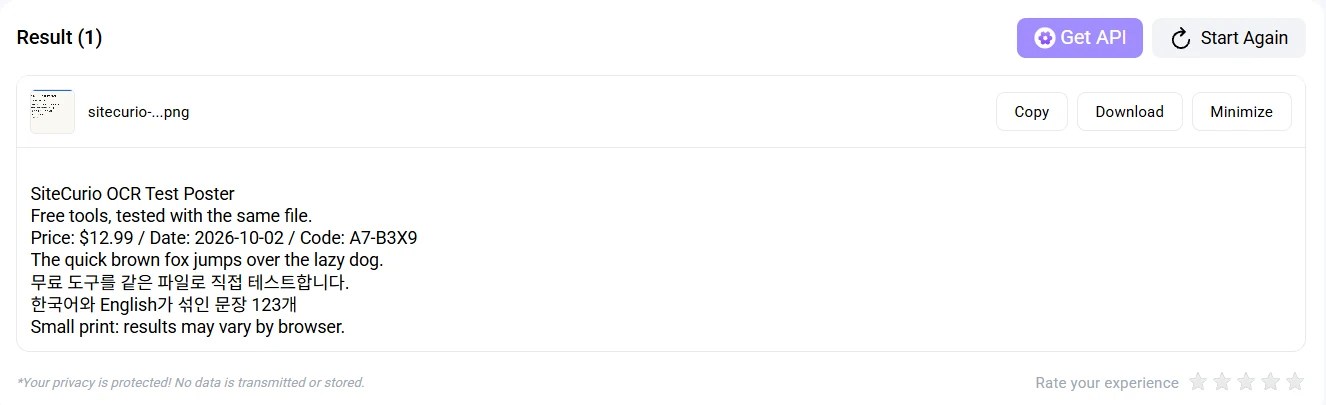
Bottom line: It extracted all 7 lines of our mixed Korean-English test poster with zero errors in about 5 seconds, no account needed. Expect lots of ads; images are processed on its server.
- ✓ 7 of 7 lines exact — tested
- ✓ Results without sign-up — tested
- ! Processed on server — tested
- ? China access — not tested yet
Our test

Test file: a 1600×900 PNG (75,607 bytes) with 7 lines: an English headline and sentence, a price/date/code line with digits and symbols, a Korean sentence, a mixed Korean-English line, and small 22px print. We know every character, so results can be checked one by one. This is SiteCurio’s standard OCR file.
Tested 2 Oct 2026 · Chrome desktop · not signed in · default mode (Simple OCR)
We compared the output with the source text character by character. Digits and symbols ($12.99, A7-B3X9), Korean syllables and the 22px small print all matched. We did not test handwriting, tilted photos or multi-column pages.
How we checked privacy: After clicking Convert, the page sent a request to imagetotext.info (/free-image-to-text, about 4.2 s) and the text came back from it. The page says “No data is transmitted or stored”, but processing happens on the server. The official privacy policy says uploaded content is removed from its system once processed.
Tool details
Each item shows how it was checked.
| Free limit | 30 conversions a day as a guest, 50 for registered users pricing FAQ Official |
|---|---|
| Sign-up | Not required Tested |
| Output | Text on the page with Copy and Download buttons (we did not download the file) Tested |
| Accuracy | All 7 lines of our standard poster exact (Korean, English, digits, small print) Tested |
| Ads | Several banner ads on the page Tested |
| File processing | Processed on its server Tested |
| File retention | Removed after processing Privacy policy Official |
| Formats | Tested with PNG. JPG, GIF, JFIF, HEIC and PDF are listed on the upload screen Shown on screen |
| Paid plan | From $6 a month official pricing Official |
| Operator | imagetotext.info, Inc. (per its privacy policy) Official |
| Access from China | — Not tested |
Our pick score ★★★★☆ 4/5 — an editorial rating from one standard OCR file, not a measurement. Accuracy was perfect; we took off a point for heavy ads and server processing. See how we test →
When to use it
Copying Korean or English text out of a screenshot or poster right away, without an account.
Before you use it
Images are processed on the server, so do not upload IDs, contracts or other sensitive documents. There are many ad banners, so make sure you click the real result buttons.
How to use it: upload an image (Browse) → Convert → Copy the result. Done without an account or accepting cookies.
Alternatives
- OnlineOCR — to get a Word or Excel fileUploads to server
A same-file comparison with other OCR tools is in the works. This file will be reused for that test.
Other options by condition
Picked automatically from tools in the same category, based on what each page states. Tools without a label may also qualify.
Tested by the SiteCurio editors · same standard file, uploaded by hand · How we test: methods and test files → · Report an error
Last verified 2 Oct 2026 · Found something outdated? Tell us.